How To Rank Higher On Google Maps In Rockwall
Boost Google Maps visibility in Rockwall: optimize your Business Profile, get steady reviews, match your website, and keep listings consistent.
How To Rank Higher On Google Maps In Rockwall
If you want more Google Maps visibility in Rockwall, start with four things: fix your Google Business Profile, get more recent reviews, match your website to local searches, and keep your business details the same everywhere.
I’d boil the whole article down like this: Google Maps ranking mostly comes down to relevance, distance, and prominence. You can’t control where a searcher stands when they search, but you can improve how well your business matches the search and how well-known it looks online. That means filling out your profile, picking the right category, getting steady reviews, and showing the same Rockwall details across your site and listings.
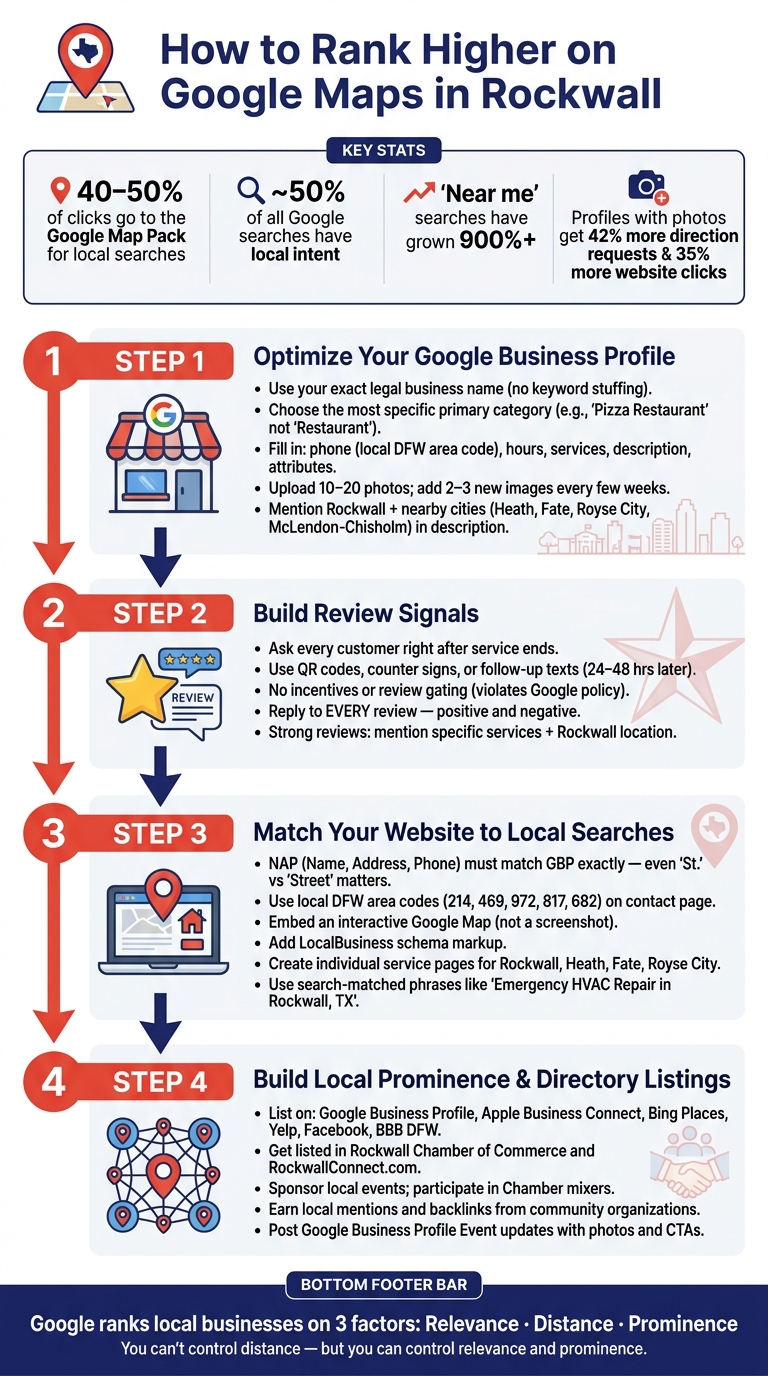
A few numbers make the point fast:
- 40% to 50% of clicks can go to the Google Map Pack for local searches
- Nearly 50% of Google searches have local intent
- “Near me” searches have grown by 900%+
- Profiles with photos can get 42% more direction requests and 35% more website clicks
Here’s the short version of what to do:
-
Set up your Google Business Profile the right way
- Use your exact business name
- Pick the best primary category
- fill in hours, phone, services, photos, and attributes
-
Get more reviews and reply to all of them
- Ask every customer
- Don’t offer rewards
- Reply to both positive and negative feedback
-
Make your website match your profile
- Same name, address, and phone
- Local service pages for Rockwall and nearby cities
- Add a live Google Map and local business schema
-
Build local mentions and listings
- Keep your business listed on Google, Apple, Bing, Yelp, Facebook, and local directories
- Join Rockwall business groups and local event pages when it makes sense
If I were doing this today, I’d start with the profile first. It sends the strongest local signals and gives you the fastest path to better Maps visibility.
How to Rank Higher on Google Maps in Rockwall: 4-Step Local SEO Guide
1. Optimize your Google Business Profile for better local relevance
Your Google Business Profile has a big effect on how you show up in Rockwall searches. Start with the basics: your name, category, and services. Those fields help Google decide what your business is and when to show it.
Choose the right business name, category, and services
Your business name must match your real-world legal name - nothing extra. Google often suspends profiles with names like "Rockwall Best Plumber – Emergency Repair". So if your company is called "Joe's Plumbing", use that. Nothing more. Keywords in the name field can help rankings, but only when they are part of the actual business name.
Your primary category is the single most important local ranking signal. Be as specific as you can. For example, choose "Pizza Restaurant" instead of "Restaurant." A simple way to check your choice is to search your main service in Google Maps, review the top three Rockwall businesses, and see which primary category they use. If the leading listings all use "HVAC Contractor", don't pick "Mechanical Contractor". You can also add up to nine secondary categories for extra services without pulling attention away from your main one.
For your services list, use clear phrases people search for in Maps. A roofing company should list "Roof Replacement Rockwall TX" instead of only "Roofing".
Fill out every key profile field
Empty fields can hold your profile back. Fill in your phone number, website, hours, service areas, and business description. Use a local DFW area code - 214, 469, 972, or 817 - instead of a toll-free number to support your Rockwall location. In the description, mention Rockwall in a natural way and include nearby places you serve, like Heath, Fate, Royse City, and McLendon-Chisholm.
Add 10–20 high-quality photos. Profiles with photos get 42% more direction requests and 35% more website clicks than profiles without them. Include:
- Exterior shots
- Interior views
- Team photos taken in Rockwall
Add 2–3 new images every few weeks to show Google the profile is being managed. Also complete every relevant attribute, such as "wheelchair accessible", "free Wi-Fi", or "appointment required." These details help Google connect your business with specific customer needs.
"Incomplete profiles rank lower. It is that simple. Google rewards businesses that provide complete, consistent, and accurate information because it builds trust for searchers." - Oscar Fullmer, Digital Marketing Expert, Plano Website Design
Keep your information consistent everywhere
Your name, address, and phone number (NAP) must be identical everywhere - on your GBP, website, social profiles, and directory listings. Even small differences like "Street" vs. "St." can confuse Google's algorithm and hurt your local SEO ranking.
Start with a quick audit of your listings and fix anything that doesn't match. If you're a service-area business without a storefront where customers are greeted, don't add a physical address. Set your Rockwall coverage in the service area settings instead. When it comes to citations, a small group of accurate, trusted listings matters more than a long list with errors.
Once your profile is complete, the next signal to work on is reviews.
sbb-itb-bbaa742
2. Build stronger review signals and respond the right way
Reviews are a core prominence signal. For Rockwall businesses, a steady stream of recent, detailed reviews shows Google that real customers are choosing you now.
Ask for recent reviews from real local customers
Ask right after the job ends, while the experience is still fresh. That timing matters.
Train your team to make a short, simple ask at the end of a visit or service call. If you run a storefront, put out a counter sign or a QR code that links straight to your review page. If you're a service business, send a text or email 24 to 48 hours later.
One thing matters here: keep it consistent for everyone. Google bans review gating and incentives, so every customer should get the same review request.
Once that process is running, the next step is just as important: reply to every review.
Respond to positive and negative reviews
Responding to reviews is a confirmed ranking signal. On top of that, many consumers read those replies before they decide whether to trust a business.
For positive reviews, thank the customer and mention the service by name. If it fits naturally, add a local Rockwall reference. That helps reinforce what you do and where you do it.
For negative reviews, keep your cool. Acknowledge the issue, respond politely, and move the conversation offline. And never post personal customer details in a public reply.
"Let's be clear: a Google Business Profile isn't just a listing; it's your storefront on the world's busiest street. Treat it with the respect it deserves, actively solicit and respond to reviews, and it'll deliver leads." - Richard Taveira, Founder, North Texas Web Design
Strong review signals vs. weak review signals
This quick table makes weak review patterns easy to spot.
| Signal | Strong | Weak |
|---|---|---|
| Frequency | Steady, recent reviews arriving consistently | Long gaps between reviews or sudden bursts |
| Engagement | Owner replies to every review promptly | No responses, or only replying to five-star reviews |
| Detail | Customers mention specific services and Rockwall locations | Vague one-word comments or star-only ratings |
| Authenticity | Natural mix of unbiased, non-incentivized reviews from real locals | Review gating or incentivized five-star ratings |
| Specificity | Customers mention the actual service and location naturally | Generic praise with no detail |
These review patterns should line up with the same local signals on your website. When your review habits become consistent, make sure your site reflects those same services and locations.
3. Match your website and local content to Maps searches
After reviews, your website needs to back up the same local signals. When your site and your Google Business Profile match, Google gets a clearer signal that your business is trusted and relevant in your area. That can help your Maps visibility.
Align your website with your profile details
Make sure your Google Business Profile details match what appears in your website footer and on your contact page. Use a local DFW area code - 214, 469, 972, 817, or 682 - on your contact page instead of a toll-free 800 number. Add an interactive Google Map to your contact page, not just a screenshot. And use LocalBusiness schema markup so Google can read your coordinates, hours, and services directly from your site.
Create service pages with real local searches
If you actually serve Rockwall, Heath, Fate, Royse City, or McLendon-Chisholm, give each place its own page. But skip the lazy version where you swap out only the city name. Each page should have something tied to that area, like a neighborhood-specific testimonial, a photo from a local job, or a detail about what customers there often need.
Use the same wording your customers use when they search. For example, "Emergency HVAC Repair in Rockwall, TX" lines up with a much narrower local search than a broad page called "HVAC Services". For a roofer, a Heath page that mentions North Texas storm damage patterns gives the page local context. For a plumber, a Rockwall service page that notes the area's water mineral content shows local know-how.
Publish local content people will share
Content gets shared when it helps with a local problem. Posts like "How to Keep Your Pipes from Freezing in a Texas Winter" or "What Rockwall Homeowners Should Know About Property Tax Appraisals in Collin County" give people something useful enough to pass along.
Community-focused posts can also lead to local mentions, which feed into the prominence signal Google uses in Maps. Local guides, event recaps, and business spotlights published through community resources like RockwallConnect.com can put your business in front of Rockwall residents and support Maps rankings. Those posts can also lead to the community mentions that help Maps visibility.
4. Build local prominence through community mentions and directory listings
Once your profile, reviews, and website line up, push those same signals into local listings and community mentions.
Get listed where Rockwall residents already look
Start with the main listings: Google Business Profile, Apple Business Connect, Bing Places, Facebook, Yelp, and the BBB DFW. Make sure each one is accurate and filled out fully. Then add listings tied to Rockwall and the eastern DFW area.
The Rockwall Chamber of Commerce is a strong local citation source and a good place to connect with other businesses. For local visibility, RockwallConnect.com is a Rockwall business directory that residents already use. A listing there can put your business in front of people who are already looking for nearby options.
Your Name, Address, and Phone number should match exactly across every listing. Even small differences can send mixed signals.
Use events, updates, and local involvement to earn attention
Once your listings are in order, local involvement gives people a reason to talk about your business.
A sponsorship at a Rockwall community event, a Chamber mixer, or a local business spotlight can lead to mentions that help your local presence. When a local organization links to your website or mentions your business in a post, those signals can strengthen your prominence.
You can also use Google Business Profile Event posts to share that involvement. Add a photo and a clear call to action so people know what’s happening and what to do next.
Conclusion: The most important steps to rank higher on Google Maps in Rockwall
Start with a complete Google Business Profile. Pick the right category, list your actual services, and use the exact same Rockwall contact details everywhere.
Fresh reviews and fast replies help keep your business visible and trusted. That also helps Rockwall customers make a choice faster. These review signals work better when your website backs them up.
Make sure your website lines up with your profile, then support it with local mentions and directory listings. Those mentions strengthen the trust signals Google already looks at. From there, stick with small, steady updates instead of one big push.
Keep your profile active with weekly posts, regular photo uploads, and quarterly listing checks.
FAQs
How long does Google Maps SEO take?
Google Maps SEO is a long-term play, not a one-time fix.
Most businesses start to see measurable movement in 3 to 6 months. In some cases, you may notice progress in 30 to 90 days, depending on how tough the local competition is and how well the profile is optimized.
SEO builds momentum over time. That’s why regular profile updates and a steady flow of new reviews matter if you want to grow and maintain local visibility.
Can I rank without a storefront in Rockwall?
Yes - you can rank on Google Maps in Rockwall without a physical storefront.
If you go to customers instead of having them visit you, set up your Google Business Profile as a service-area business. Then add your service area - for example, Rockwall - instead of showing an address that customers can’t visit.
What hurts Google Maps rankings the most?
The biggest issues usually come down to two things: an incomplete or poorly set up Google Business Profile, and business details that don’t match across the web.
Here’s what that often looks like in practice:
- Incorrect Name, Address, and Phone details
- Old business hours
- Wrong or overly broad categories
- Weak review activity
- A website that doesn’t back up your local presence
It may seem minor, but small mismatches can create a mess. If Google sees one phone number on your site, another in a directory, and old hours on your profile, it gets mixed signals. And when your Google Business Profile is thin or outdated, you make it harder for local customers to find and trust your business.
Related Rockwall Businesses
-
Lead Fuel CRM
Your Entire Business in One App. Phone, email, text, invoicing, contracts, automation, AI, websites, funnels, reviews, s
-
PxlPerfect Designs
At PxlPerfect Designs, we believe in more than just websites and SEO - we believe in helping businesses grow, supporting
-
Cards on the Harbor
Cards on the Harbor is Rockwall's collector store for verified Pokemon singles, rare vintage foils, and factory-sealed b