Rockwall Business Permits: Step-by-Step Guide
Step-by-step guide to Rockwall business permits: zoning, COs, building, fire and signage permits, online filing, inspections, timelines, and cost tips.
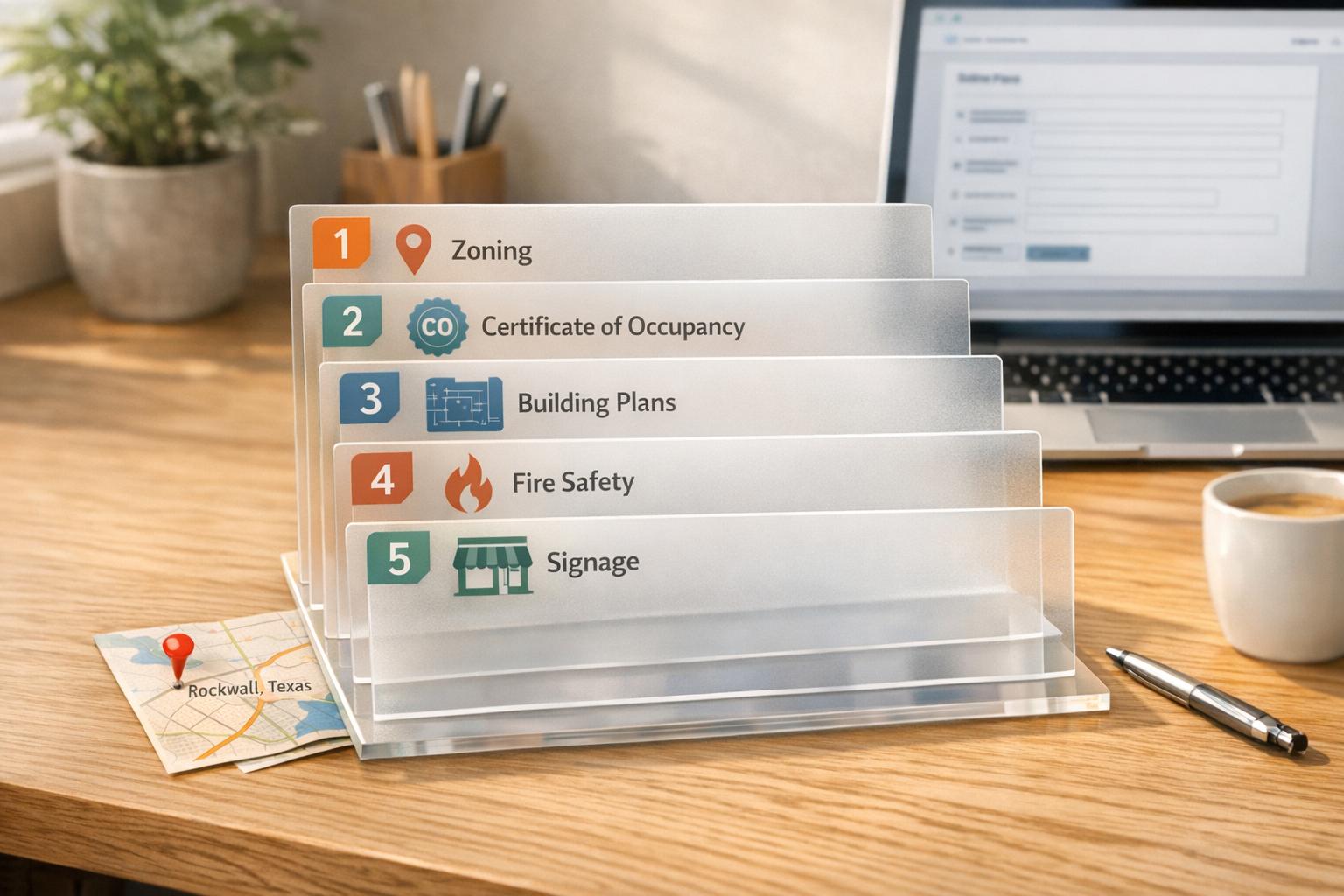
Rockwall Business Permits: Step-by-Step Guide
Starting a business in Rockwall, TX? Here's what you need to know about permits to get started legally and efficiently:
- Permits depend on location: Businesses in City of Rockwall limits follow city-specific rules, while those in unincorporated Rockwall County adhere to county regulations. Picking the wrong jurisdiction can delay your project.
- Certificate of Occupancy (CO): Required for all businesses before opening. It ensures your space meets safety standards for electrical, plumbing, and structural systems.
- Other permits: Depending on your business type, you may need building, fire, signage, or short-term rental permits. Contractors must register before starting work.
- Key timelines: Permits expire if work doesn’t begin or halts for more than 180 days. Reviews typically take 30–45 days.
- Online applications: Use the CityWorks Public Portal for submissions, payments, and tracking. For backflow testing, use SC Tracking Solutions.
Pro Tip: Gather documents like zoning confirmation, contractor details, and project valuation early to avoid delays. Check zoning laws before committing to a property to ensure compliance.
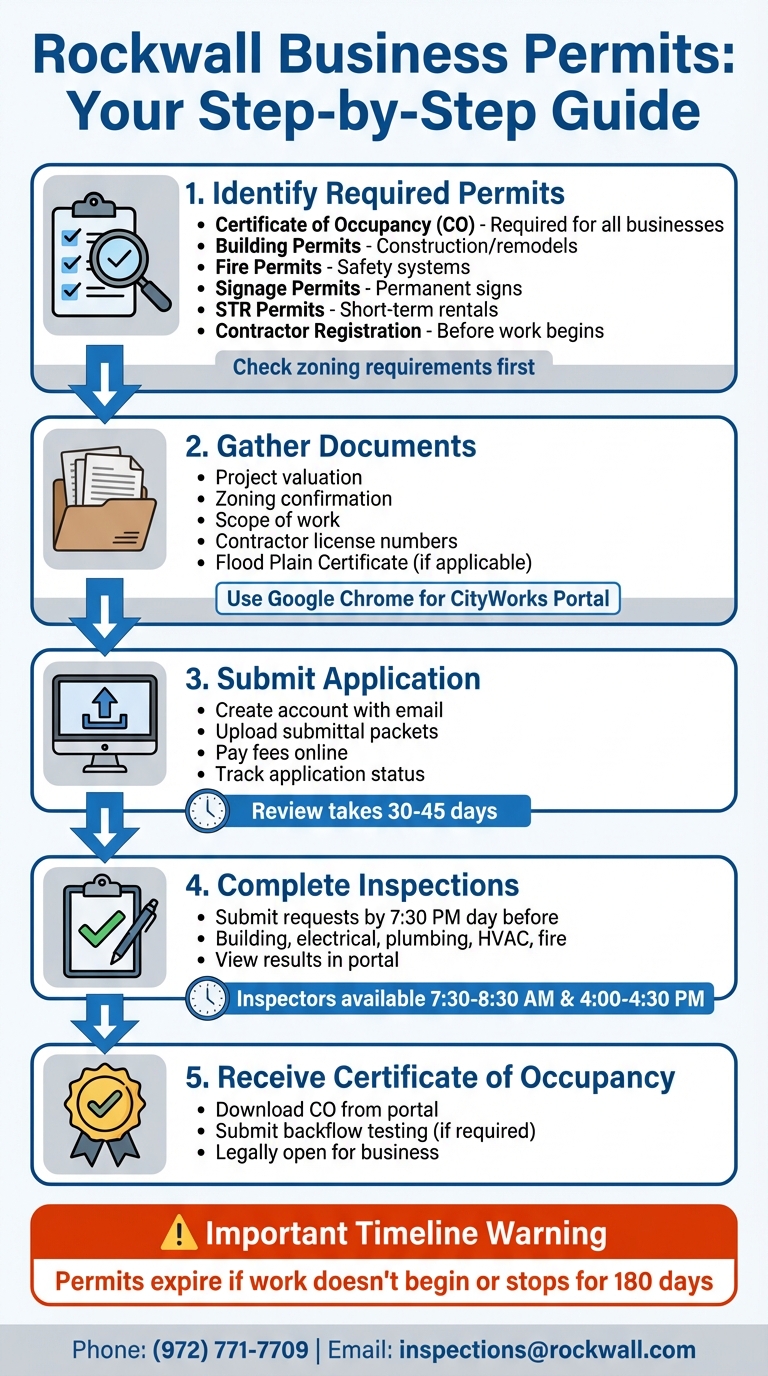
Rockwall Business Permit Application Process: 5 Essential Steps
FAQ: How do I determine what permits or licenses my business needs to operate in Texas?
You can also explore Rockwall area businesses to see how local companies navigate these requirements.
sbb-itb-bbaa742
Identify Which Permits Your Business Needs
Getting the right permits is a crucial step in setting up your business and exploring Rockwall, TX. The type of permits you’ll need depends on your business category. For instance, the requirements for retail stores, restaurants, and home-based rentals vary significantly. Start by identifying which permits apply to your business and check local zoning regulations to ensure compliance before submitting your application.
Check Zoning Requirements
Your business location must align with local zoning laws. When completing the Rockwall County Commercial Permit Application, you’ll need to confirm that your project address complies with zoning regulations. Operating in an area not zoned for your business type can delay or even halt your plans. Verifying zoning early helps avoid complications during inspections and document preparation.
Short-term rentals (STRs) face especially strict zoning rules. STRs are not allowed in non-residential zones, and in residential areas, non-owner-occupied STRs must maintain a 1,000-foot separation and cannot exceed 5% of the total units. Before committing to a lease or property purchase, consult the Planning & Zoning Department to avoid costly errors.
Common Permit Types
| Permit Category | What It Covers | When You Need It |
|---|---|---|
| Certificate of Occupancy (CO) | Ensures your space meets safety standards for mechanical, electrical, plumbing, and structural systems | Required before a business can legally occupy a building |
| Building Permits | Covers new commercial construction, remodels, finish-outs, retaining walls, and driveways | Needed for any structural work or significant interior changes |
| Fire Permits | Includes sprinklers, alarms, kitchen hood suppression systems, hazardous materials, and high-piled storage | Required for businesses using fire protection systems or storing hazardous materials |
| Signage Permits | Applies to wall, monument, pole, canopy, and electronic message signs | Required for installing permanent signage or temporary banners |
| Short-Term Rental (STR) Permits | Registration for residential units rented for 12+ hours but less than 30 days | Necessary for operating any short-term rental property |
| Contractor Registration | Covers contractors performing plumbing, mechanical, electrical, or irrigation work | Required before contractors can begin work on your project |
Some businesses may need additional permits. For example, food trucks require operational permits, and businesses selling alcohol must obtain a TABC (Texas Alcoholic Beverage Commission) license in addition to city permits. If you store liquid propane gas tanks or handle hazardous materials, you’ll need extra fire operational permits. Certain businesses may also need a Specific Use Permit (SUP) from the Planning & Zoning Department.
Here’s a helpful tip: if you’re modifying fire sprinklers, you only need to submit plans if the changes involve 20 or more sprinkler heads. Smaller modifications might not require a full review, saving you time and money.
Gather Required Documents
Getting all your documents in order before starting your permit application can save you a ton of time and hassle. The City of Rockwall processes most applications through the CityWorks Public Portal, so make sure to use Google Chrome to avoid any technical glitches. This digital-only submission process helps keep things efficient and ensures compliance with city standards.
Documents You'll Need
For a basic Commercial Permit Application, you'll need to provide several key details, including:
- Project valuation
- Zoning confirmation
- A clear scope of work
- Classification of your project (New, Addition, Remodel, or Finish-Out)
You'll also need to include contact information and license numbers for your Architect, Engineer, General Contractor, and any Mechanical, Electrical, or Plumbing contractors involved.
If your property is located in a floodplain, you’ll need a Flood Plain Certificate. Make sure to check your property’s status early, as your application can’t move forward without this document.
Additionally, all contractors working on your project must register through the CityWorks portal before any permits can be issued. Starting February 20, 2025, backflow testers will also need to register through the SC Tracking Solutions portal.
Application Checklists by Business Type
Rockwall offers specific Submittal Packets tailored to different types of projects. These packets act as guides to ensure you don’t miss any required documents. You can download the checklist that matches your project type from the Building Inspections page.
| Business/Project Type | Required Documents & Checklists |
|---|---|
| Commercial New Construction | Commercial New Construction Packet, Site Plans, Contractor Registrations, TPO Energy Provider info |
| Commercial Remodel / Finish-Out | Commercial Remodel/Finish-Out Packet, Asbestos Survey Requirements (if applicable), Scope of Work |
| Permanent Signage | Sign Permit Application, specific checklist (Wall, Monument, Pole, or Canopy) |
| Short-Term Rental (STR) | STR Registration Form, Liability Insurance Proof, Hotel Occupancy Tax info |
| Certificate of Occupancy | CO Application, Fire Pre-Inspection Checklist |
For remodels, be aware of Asbestos Survey Requirements, especially if the building is older. Testing for asbestos can take weeks, so it’s smart to address this early if it applies to your project.
Short-term rental applications have their own specific requirements, such as proof of liability insurance and hotel occupancy tax details, in addition to the standard registration form.
Submit Your Application and Track Status
Submitting your application and keeping tabs on its progress has never been simpler. The City of Rockwall offers an online portal that streamlines the entire process, ensuring you can stay informed every step of the way.
How to Apply Online
If you're a business owner or contractor in Rockwall, the CityWorks Public Portal is your go-to platform for submitting building permit applications, Certificates of Occupancy, and contractor registrations. To ensure a smooth experience, it's best to use Google Chrome for accessing the portal.
Here’s how it works: Start by creating an account using your email address. Once you receive a confirmation email, activate your account through the link provided. After activation, you’ll have access to a range of features, including uploading submittal packets, paying fees, and tracking your application status. You can also view real-time review comments and download approved plans and permits directly from the portal. For any technical assistance, the Building Inspections department is available to help.
For projects outside the city limits or backflow testing registration, follow the specific guidelines provided by SC Tracking Solutions or the relevant county authorities.
Once you've submitted your application, it’s important to familiarize yourself with the typical processing times to plan accordingly.
Processing Times
Keeping an eye on your application status is key to staying on track. Permit reviews generally take 30 to 45 days, depending on the complexity of your project and the completeness of your submission. Be aware that permits will expire if construction doesn’t begin within 180 days or if work is paused for 180 days. To avoid delays, promptly address any review comments and remain actively engaged in the process. This approach will help ensure your project moves forward smoothly and your permit remains valid.
Complete Inspections and Get Final Approval
Once your permit application has been reviewed, the next big step is scheduling and passing the required inspections. These inspections are crucial - they confirm your business complies with all necessary safety codes. Once everything checks out, you’ll receive a Certificate of Occupancy (CO), which officially allows you to open your doors to customers.
Schedule and Pass Required Inspections
To schedule inspections, use the CityWorks Public Portal. Submit your request by 7:30 PM the day before you need an inspector to visit. The portal is also where you can check inspection results and read inspector comments.
Most businesses will need multiple inspections, covering areas like building, electrical, plumbing, HVAC, fire safety, signage, and even driveways or flatwork. Each inspection ensures compliance with the adopted International Building Codes and local safety standards. For fire safety inspections, download the CO Fire Pre-Inspection Checklist from the Building Inspections department. This checklist will help you cover key items like fire extinguishers and exit signs.
"Building codes are adopted and inspections completed to address safety issues and hopefully to avoid problems for our residents in the future." - Jeffrey Widmer, Building Official
Need more details about inspection requirements? Building inspectors are available Monday through Friday during 7:30 AM – 8:30 AM and 4:00 PM – 4:30 PM to answer questions. The City of Rockwall Building Inspection Department is fully certified by the International Code Council, with every staff member holding national certifications. This ensures a high level of expertise and safety standards, supporting local businesses as they grow. If you run into issues with the portal, email inspections@rockwall.com or call (972) 771-7709.
Get Your Certificate of Occupancy
Once all inspections are successfully completed, you’ll receive your Certificate of Occupancy (CO). This document confirms that your space meets all building, fire, and safety codes. You can track the status of your CO and download it directly from the portal.
If your business requires backflow testing, make sure to submit those reports through the SC Tracking Solutions portal. The city started using this system on February 20, 2025. Completing this step finalizes your approval and officially allows your business to operate.
Permit Costs and How to Save Money
Fee Schedule and Timeline Estimates
Permit fees in Rockwall are determined by your project's valuation and square footage. Payments are handled through the CityWorks Public Portal, covering everything from building permits to certificates of occupancy and contractor registrations. For commercial new construction or remodels, you’ll need to provide a valuation upfront, which will set the total fee.
Contractors also need to register and pay fees for all required trades before starting work. If you're opening a short-term rental, be aware of the specific permit and registration fee outlined in the ordinance effective April 1, 2024. Permits will expire if construction doesn’t start or is paused for 180 days, so keeping your project on track can help you avoid unnecessary costs.
Now, let’s look at some practical ways to keep these costs down.
Ways to Reduce Permit Costs
To save on permit fees, avoid letting your permit expire. Plan your timeline carefully so work begins promptly after approval, eliminating the need to reapply. Use the city’s submittal checklists for Commercial New Construction or Commercial Remodel/Finish-Out projects to ensure your application is complete on the first try. Incomplete submissions can lead to delays, which often increase carrying costs and labor expenses.
Schedule inspections wisely by submitting requests before 7:30 PM the day prior. This keeps your project on schedule and prevents labor downtime. Make sure to stick to permitted construction hours - 7:00 AM to 7:00 PM on weekdays and 8:00 AM to 7:00 PM on Saturdays - to avoid fines for noise violations. Construction is strictly prohibited on New Year’s Day, Thanksgiving, and Christmas, so plan accordingly.
If you’re relocating or expanding a business, check out the Rockwall Economic Development Corporation (REDC). They offer financial incentives that can help offset permit or impact fees for qualifying companies. Home-based businesses, as long as they comply with zoning rules, are exempt from registration and permit requirements, which can also save you money. For affordable contractors familiar with city requirements, visit RockwallConnect.com to find local professionals who can guide you through the process efficiently.
Conclusion
Tackling Rockwall business permits can feel overwhelming, but a step-by-step approach can make it much easier. Start by determining the exact type of permit you need - whether it’s for a new construction, remodel, or finish-out - and ensure you meet all the necessary requirements. Be sure to gather all professional credentials, such as license numbers for your general, mechanical, electrical, and plumbing contractors, before submitting your application. Having all your paperwork in order helps keep the process smooth and efficient.
Timing is critical to avoid setbacks. Permits will expire if construction doesn’t begin within 180 days or if work halts for 180 days. To stay on track, plan ahead, schedule your final inspection, and secure your Certificate of Occupancy before moving into the building - this step is legally mandatory.
If you have specific questions, especially for unique cases like signage, reach out to the Plans Examiner at (972) 772-6774. Use the city’s official checklists to double-check your application and prevent unnecessary delays.
Once your permits are in place, focus on building local awareness. Listing your business on RockwallConnect.com is a great way to connect with residents and increase your visibility in the community. With the right preparation and local tools, you can navigate the permit process efficiently and get your business up and running sooner.
FAQs
Am I in the City of Rockwall or unincorporated Rockwall County?
To figure out your location, check if your property or business falls within the City of Rockwall or in unincorporated Rockwall County. If it's within the city, you'll need to go through the Rockwall Building Inspections Department for permits. On the other hand, properties in unincorporated areas follow Rockwall County's procedures. Knowing your jurisdiction is key to ensuring you're following the right steps for permits or business licenses.
Do I need a new Certificate of Occupancy if I’m moving into an existing space?
A Certificate of Occupancy isn't required when moving into an existing space. However, Rockwall County must issue one before the space can officially be occupied. Make sure to check with the local authorities to confirm the specific requirements.
What happens if my permit expires after 180 days?
If your permit expires after 180 days without any work being completed, or if it is suspended, it will no longer be valid. To resume or continue your project, you’ll need to submit an application for a new permit.
Related Rockwall Businesses
-
Lead Fuel CRM
Your Entire Business in One App. Phone, email, text, invoicing, contracts, automation, AI, websites, funnels, reviews, s
-
PxlPerfect Designs
At PxlPerfect Designs, we believe in more than just websites and SEO - we believe in helping businesses grow, supporting
-
The Mailbox Marketplace
The Mailbox Marketplace is a locally owned advertising company created to help small businesses connect with customers i